Thursday, August 25, 2011

Cerebrum Mysticum...

A mystic week of some sort. I've suddenly felt the urge to go on and read about mystics and occult. Well, I did have the urge for some time in my life and such things are really normal to strike in my head now and then, but this time I'm thinking of doing more to it into photography.
Now it is the time of the last week in Ramadhan and sort of the time is clogged (specially with my disturbed sleeping pattern) with many things to do. I'm also planning to register in a photography class for beginners after Ramadhan directly, by September 6th. Yes, for beginners. No matter how or what I did before or what advance level I might be in, it is always good to look back at small things that you did not know before. Despite my work so far, I still think I need to learn more about the basics of the camera and exposure. After that class I might take other levels as well (more expensive of course) but we'll see about that later on.

At work seems more busy days are coming on the way with new phases in our "little" experiment taking place now, thus I have to check that I need to type this blog entries as early as possible to be posted in time! Well, which means, in return, that I might have lesser contents to put in here. That is if... anyone cares anyway :)

Because of the disturbance this week, I couldn't put my mind into reciting the 4th chapter of Alexander's story. Well, I'll be frank. I was lazy and playing a game I like. Hope that doesn't count as a sin! But hopefully the engine will get to work by next week or so and more recordings on the way.
The lack of work on my Ayvarith projects, however, poured something on the other side. Ive finally had the mind (and courage) to write something down. But this time, since staring on the notepad on my monitor was not enough to gush out words, I referred to my old method; a paper and pencil/pen. I had the words for some time now but I didn't pin them down until I faced the pen and paper in my office, after working on that experiment. I called it No Superman.I've submitted this one to some websites, and in one website actually, some user notified me asking how did I write such a thing! Well, Thanks! I really don't think I'm good at all. It's just a gush of feelings to a certain matter that makes you spill it out.

I. Mysticis:
Seems my night on the roof last week under the full moon made me literally lunatic, or maybe inspired? Call it whatever you want to, it is just a weird feeling of seeking opportunities to take photos of anything in rhyme of Mystics. I will get back to that panorama taken from the roof after a while.
One of the first ideas to do something mystic kicked in when I finished reading the holy book.

Chapter of Mary (19)

There is a little story behind every aspect of this image. First of all, it was taken with a fisheye lens and hence, even with a high f-number I realized I might not be able to grab everything into sharp focus; so it was a call for focus stacking. However, I had a problem with the shadows' cast on the book itself thus, I had to turn off the light and use only one source of lighting (the usual old desktop lamp with power-saving light!).
I've fixed the WB value by using the custom K-value in camera. Since the power-saving light is bluish and I wanted to add a sense of antiquity to the book, I had to exaggerate a bit with the color temperature (K-value) and probably pushed it to something lesser a bit than 10,000K! Anyway, while working with these photos (taken with bracketed exposure for HDR merge) there was another story. Because when I was testing the different WBs before the final approach, I've realized that Tungsten makes some interesting hue, by turning the book blue and the red lines in it were glowing hard; so eye-capturing, but later on I had to give up this idea in favor of Daylight WB when I started to merge into HDR (you can change the WB before starting to merge into HDR in Photomatix).
Now, all the HDR slides, after merging, refer to different focus points. In total they were about 5, with each slide bringing a certain area of the open book into focus. I had a little problem merging first because I didn't use the alignment in Photoshop (I thought it's not needed because everything was relatively stable) but then, seems I was wrong and I used to correct for the broken lines. I made 3 versions of the HDR slides changing the WB from Daylight to Fluorescent to Tungsten BEFORE merging into HDR, but seems the desired look in my mind was in Daylight (the other WBs made some weird noise and hot pixels occurring here and there).
Maybe keeping the front portion of the book, where the title of the Surah lies, and blurring the background (the other page) was a nice effect, but because the name of John (first word in first line in second page) sounded a bit important to the whole story of the picture, I've decided to include it into a focus-stacking method as well. Cropping and rotating the image (it was originally in landscape orientation) was done later on after tone-mapping (Photomatix of course) and adjusting in Photoshop.
This was one trend of mystic (and I mean mystic not as mysterious only but also on a spiritual level) and in fact I was doing more work before that with long exposures (since I became a bit obsessed with the idea). Maybe working with clocks is not a mystic thing but the concept of time and using time was always an issue in my life (and probably of many around the world), hence, we can consider it a mystic concept of our lives, as we try hardly to catch upon life. More about it to come later.
Left to say one thing. The image above was rejected by Bigstockphoto because of some "copyrighted material" issues. Seriously? I'm going to ask God for a permission to take a photo of the holy book? Sorry dudes, that doesn't make sense...

II. A Treasure of Perspectives:
Since having a night with a full moon is not something you be able to catch every day, sorry, every night I mean, I've decided to mangle and go through the panorama again and again trying to extract more perspectives, and in return, more meanings from every picture I could make out of this (spherical) panorama. The first version, however, was a typical little planet form (posted previously):

The Lonely Planet

Well, I guess the name tells it all. I liked the effect myself and I went on trying to extract more from this panorama by changing the perspective. One of these changes makes up for almost a landscape orientation (or let's say a full-frame) image but with simple difference: everything is twirled.

Over There

It is not a panorama, but it is extracted from a full spherical panorama itself. After setting the stitching projection to "little planet" in PTGui, I started to play around with angles of Pitch and Roll trying to discover more perspectives. Until I've finally arrived to this angle which resembles the full moon at the end, in the horizon, like calling as it is a light at the end of a tunnel. A spark of hope in the middle of the night. I didn't mind the distortion in the surrounding structures, as I was reliant on the moon to grab the sights more than the surrounding structures. However, they do add some surrealism if you are up to that!
Before, I've stated that in long exposures at night, sometimes the stars that do not appear to the naked eye can be recorded, and they are here in this panorama, but they are usually erased with cleaning the noise and doing other techniques to smooth out the sky. Here, however, I decided to pick (some) stars and exaggerate their sparkle by using the regular brush in Photoshop. After all, I added some Photo Filter adjustment layer to put on a reddish wash on the whole scene to break its severe blue shade. Hmm, I think it adds a bit to the mysticity.
A vertical panorama was done as well, naturally (but I didn't think of it first!) and here I needed to move the central point to make some interesting perspective, of two skies, up and down. I didn't experience though how it would look if the skies met in the middle!

The Underworld


But I was taken more by the tunnel view for this panorama, which many people liked on MostPhotos...

To Another Universe

This perspective specifically was just an experiment to test how good it is to do a Twirl effect like in those Sci-Fi stuff. The problem with the Twirl effect is that it might smudge too much and not achieving the proper look I'm aiming for, and, you have to work in 8bit format, since it is disabled in Photoshop in 16bit format. In other words, you have to step down a bit with color's resolution.
The original work was stitched with 4000x4000 pixels. Usually I go for 8000x8000, which requires a lot of processing power and time. Since I was thinking it might be a failing experience after all, there is really no need to aim high and 4000x4000 is just enough.
The looks at the time of tone-mapping this tunnel-view was totally different and dull, despite the fact that the HDR slides were merged using ProPhoto color space. However, after tone-mapping and opening the image in Photoshop (which I've fixed on ProPhoto as a default color space) the image appeared as you see it above with cyan patches around the ground. Comparing the two looks, the Adobe 1998 and the ProPhoto, I thought the ProPhoto space is more adequate to the mystic and sci-fi look I'm seeking, and this is what you see above.
The twirl effect was done to the image on a separate layer and I made it carefully in a small amount to add curves but not diffuse the image totally. A twirl alone is not enough as a good effect and this is the reason why I made it on a separate layer, so that I can retain the position of the moon in the horizon back to its place by using layer masks (to erase the twirled moon and put on the original moon back in its position from the lower layer). The name is obvious I presume; did it take you to another universe!?

III. Tick Tocks and Blinks:
As I've stated earlier, I was (and still) obsessed a bit with the idea of long exposures, time, and, clocks. This obsession raises up from my interest to see things, slow things specifically, run fast. How would it be to take a long exposure of a moving snail, or a turtle, of a long night sleep...etc? Maybe my interest in night photography lead me to this point now, but however, it is not something new really. I've already created an image of a little long exposure before (and unfortunately rejected from major stock sites).

Busy Life

Maybe the above image was one of the best I've did so far. In fact, and because I used my Tamron lens raised up high above the watch, I didn't use here any ND filters to control the time. I don't have an adapter to fit my Cokins. However, this effect after all was not done by long exposure alone, but I had to take several shots over a period of around 6 minutes and then blend them together in Photoshop in layers (using Soft Light blend).
Same concept was done but with a more time-stretching aspect this time, taking shots at an interval of around 3 minutes and some few seconds for one of my watches. This time I've faced a problem with the proper WB, as I wanted to add some more luster to the golden patches in the watch itself but then there was a problem of being "over-average" with that effect.

Mixed-Up Schedule

The WB was fixed as the RAW files were opened in Photoshop and the effects were synchronized with all the slides. The reason for setting the time to 3 minutes AND few seconds is that I didn't want the seconds hand to end up in or around the same place with every shot taken at exactly 3 minutes, so I had to add few seconds (something like 10 or 15 seconds) to the interval between every two shots to give more chances of finding the seconds hand somewhere else, other than the previous position. Each image, in fact, was itself some sort of a long exposure (my room was partially dark) extending from 15 to 30 seconds each.


Still though, I didn't quite achieve the effect that I want, that is recording the seconds hand going over in a full circle around the clock face. Tried this already with my wall clock for which the seconds hand ticks continuously non-stopping in every second, but it goes smoothly all over the clock face. With the help of some ND filters, I've managed to get a long exposure of one hour. Despite the weird reddish shades that occurred in the final image (which might be related to the change in the sun's angle outside, because sun rays still pass with my curtains off, but I'm not sure yet), however it was not a big deal to fix the image and make it look normal, but it was a big issue with the noise. Anyway the image didn't achieve exactly the desired look I'm seeking.

Hurry Up!

The Median method was a companion all through the cleaning process (along with cloning to remove the brand mark, otherwise it won't be accepted in stock sites!). However, the small circle inside is formed by the seconds hand, but the seconds hand is larger than this and should, probably, made a bigger trace. Same thing for the minutes hand which appears blurred between 3 and 4. This is natural since the light is introduced (with the help of ND filters) slowly into the camera and to register the final movement just before the close of the shutter, the minutes (and seconds) hand will be in a certain place. The shutter then closes finalizing the image and the hands' movement all the way were not recorded except in a few portion of the clock face. In other words, to record the movement of the minutes hand across the full clock face, then we need an exposure time more than one hour. This will make things harder to do indeed.
The look of the blurry movement and the stable background of the clock face cannot be compensated by taking photos in intervals and layering them with a blend. The blur has its own taste and feel. I'm trying to find any website (official that is) related to the manufacturers of these watches and clocks just to seek my luck in asking for a permission to put an image of their products for sale. It is not possible to clone out the brand mark all the time!

That was the ticking part of this final portion. Comes then the blinking part. Just for fun I was running with my camera in the house taking pictures of my niece playing around (and getting on my nerves as well) when I decided then to take pictures of my brother's eye. This little experiment made me believe more than not ever overexposure is a bad thing and not every "bad" image is really bad. The image got accepted in some sites and rejected from some stock sites (for model release aspects). I have to give credit to my brother though because the poses (or looks) were his ideas in fact.


Photographer in The Eye

In case you wonder about the name, it is because my reflection is there, inside the pupil. This is one of my favorites, and it is not a tone-mapped HDR at all. Simply taken with a flash unit mounted on my camera and zooming into the eye with my EF-S 18-55mm Canon lens. Some adjustments were done later on of course in the RAW editor. The thing is, I didn't plan it. I merely took the image to see the details of the iris later on, but the whole image just happened to be awesome for me. More sharpening added a grunge look, which somehow might be not good looking for other images and concepts. See, overexposure is not a bad idea at all, to limits. I've printed this image on a white photo paper, which probably if mounted on a white wall (and erasing a bit of the edges in the image itself) would be an awesome effect on the wall! Surprise your fellows with an eye popping out of the wall!
The other two images were also done with the same lens but without flash, and the pose was also suggested by my brother. They are interesting, but don't beat the one above I believe.

Enlighten
looking at the ceiling.

The interesting thing about "Enlighten", beside the reflection in the eye, is the sharp eyelash line and eyebrow. I added even more sharpening (with noise cleaning) and also some change in saturation and hue to pop out the eye in between a dark skin (his skin isn't that dark really!).

Psycho
"Psycho" on the other hand was a good concept in color, but two reasons made me convert it into Black and White and try to increase the contrast from there to give a tougher feeling. The first reason is simply the idea of  a psycho, which I believe is represented better in Black and White instead of color. Remember that Black and White images tend to make the viewer concentrate on the concept and the composition instead of the color gradients in the image. The other reason was that a bluish streak around the eyes that I didn't know exactly how to remove properly, so along with the first reason I thought it is better to have the whole thing in Black and White. Maybe I should have done some skin smoothing (Median method again). Well, it might intensify the effect of a Psycho with such a skin!


Almost, this is what I have been doing this week. I'm still looking forward for more experiments to do but I need some planning. I took some photos for some instruments and devices in my work place, but I don't think I'm allowed to put those here. However, I think they are sort of boring, except for geeks of course!
T.G.I.T. Finally a day when I can't complain about my sleepless night, nor I have to wake up so early....


Thursday, August 18, 2011

A Bulughman In A Lonely Night!

Officially 31. Not much to do about it really, except of having a casual day to myself and sleep as much as I wanted. Well, that won't exceed 5 hours in best conditions. This week was slowly passing really, but I didn't have much to do with my camera, so maybe this is the reason why I felt it as slowly going. Anyway, I was pushing myself forward with my Ayvarith recording and finally recorded and finished Chapter 3 of Alexander's story. I could hardly stop laughing at myself while recording, so please don't mind the quality and the awkward presentation!
Ayvarith: here.
English: here.
Memorizing now these moments and all that work I had to do with this story makes me smile a bit. I've totally forgot about the other conlangs that I've initiated but totally forgot about them, specially the one named Bulughman.

Beside this recording, which took on several days actually and not a single one day, I took the chance to use the full moon for my benefit and have a panorama made from the roof top. Almost a complete panorama and not only a 360 panorama. Not so satisfied about it but it was an experience that I liked indeed.

I. Outtake #1!
I can say it is my first night-time panorama for the time being. I had to use the full moon to my advantage before it disappears from the skies so I was willing to work whatever the temperature would be. Anyway, the temperature was not as bad as before (gone down to 30s C as told by forecasts, while it was in 40s last week!). It wasn't all perfect of course and the noise played a major factor in this, but well, it's a lesson. But the most significant thing about this panorama is the lengthened workflow, which probably was not a good thing to do after all...

A Lonely Night

The Workflow (The Drama):
  1. In the beginning and after settling with my tools on the roof top, I went on doing some metering just to estimate the time I would need. The necessity to work as fast as possible (the moon moves across the sky) made me trade off with raising the ISO to 1600. Since I'm going to take a bracketed exposure for HDR (-2EV,0EV,+2EV) it was essential to ensure that when I go on with auto-bracketing that the exposure time won't exceed 30 seconds. 30 seconds is the limit in Av mode. I've metered some spots across the sky and the building fixing the EV to +2 and raising the ISO to 1600 which was the minimum ISO I could have an exposure time lesser than 30 seconds (15 seconds it was). However, the camera also had other plans of itself! I tried to choose an ISO following the stops starting from ISO100, but not the ranges in between, that is: 100, 200, 400, 800, 1600, 3200, ...etc. Although there are some ISOs in between as 160, 250 and so on, but according to some articles that these would be more noisy because of the circuitry involved in increasing and amplifying the signal, and it is better to have an ISO within the range of full stops.
  2. To be on the safe side, I've used the hyperfocal principle again, and fixed the aperture to f/8. This aperture, however, did change by itself as the automated process was going on. There are some spots across the panorama that, apparently, required more than 30 seconds to achieve the +2EV exposure and I've noticed at some points that the f-number did change by itself within the camera to f/7.1 (i.e. larger aperture than f/8) to allow for more light in.
  3. The white balance is fixed according to effect and not in desire to achieve a true balance of colors. My previous work with the moon on the roof a week or two back gave me an impression that the blueness of the sky is better and more attractive than a normal regular one. The whole thing was set by using the LCD display (which is not a good judge after all but a good estimate let's say) and from there I've fixed the WB to the minimum value of 2500K. Blue.
  4. The work on the roof continued normally and my eyes adapted slowly to the darkness there but I needed my small LED light to check the scale on the rotating disk of the VR-head to make sure it reached a 0 degree after a full cycle. I didn't bother about a nadir but I did take 2 shots for zenith, which later proved unnecessary, specially that I have no intent for a QTVR.
  5. Now moving to the lab, i.e. my PC. I think my first mistake was made up here. In order to reduce the noise level which I was almost sure of to be unaccepted because of using ISO1600, I've directly converted all RAW files into TIFF 16-bit format (using Photoshop this time and not DPP). I made this move to run NeatImage on the TIFF files and clean the noise accordingly (and put little sharpness as well) but seems it was a wrong step. Reasons will come later.
  6. After running NeatImage and batch processing all the TIFF files for noise reduction, I ran Photomatix for batch HDR processing. I have now 41 OpenEXR files created from the "cleaned" TIFF files.
  7. In PTGui now and because of the nature of the HDR files and the night scene on the roof, and because so much sky was involved in some slides, there were many slides that PTGui could not identify any points for, hence the slides were astray and "orphaned", meaning not connected to any image at all. There I decided to go on with "model" method.
  8. The model method, as I call it, is simply to batch process the individual HDR files into JPGs or TIFFs and plugging them into PTGui. This way, usually, PTGui is able to find more control points more easily. We save the file, which contains all data about control points and other parameters and positions of the slides and apply this template to the HDR panorama we are working with. A lengthy procedure but at times, it is a must. I went on tone-mapping the HDR files in a batch process in Photomatix, but first I picked one of the darkest slides (and it was one of those that didn't connect to any other images) and tone-mapped it to make it brighter and clear in most of its regions. The settings used in this tone-mapping is saved to be used for the rest of the slides.
  9. To my ill luck, after tone-mapping all slides, PTGui still didn't identify some of these tone-mapped images and could not connect them to each other although many features in the scene are obvious. Seems however, and after a close check up, that the difference in the noise level between two adjacent slides makes it difficult for PTGui to put on control points between the two despite the "visual" apparent common features. Here, and at this point, I realized it was wrong to clean all the TIFFs from the early beginning, and later on, more confirmation to this thought appeared.
  10. I had to put my own control points here although it is a process that is tiresome and I really don't like it because, let's face it, a human being won't be as precise as a computer and needless to say someone like me who can barely concentrate for a long time. I'm not sure even how I'm typing this! Anyway, the addition was done and the file was saved, and the template or model was applied to the original HDR panorama in PTGui. Everything was organized almost with some few broken lines that I directly decided to fix in Photoshop instead of wasting time doing a game with blending priority.
  11. The HDR panorama is now stitched and time for the fixes and cuts in Photoshop. Beside the regular fixes, I had to make an adjustment to the exposure (putting some areas down and raising up some) but before doing all the "local" adjustment, a major (global) fix for the exposure was due by using the white dropper on the brightest possible area in the scene. This is to bring some balance and brightness to the scene (which later on resulted in a good HDR histogram relatively).
  12. Tone-mapping the adjusted HDR file proved more that cleaning the noise in the early beginning was a wrong thing to do. It became more obvious that there were batches of noises while some areas were relatively clean. Seems that I have to keep the noise reduction procedure at the every end of the workflow to make sure that I don't get such patches of noisy areas and clear ones. To over come this problem, and back in Photoshop after tone-mapping, I went doing my usual Median trick that I do usually on skin to eliminate rigid features. This though made me lose some interesting dots in the sky with the rest (stars do appear sometimes with a long exposure. Orion belt was even obvious in the images though it wasn't visible to the naked eye).

The histogram of the panorama in gaussian-like shape. Might not be always a good sign to have most of your exposure around 0EV, but it's good that there is no sudden cut in the graph itself.


II. Outtake #2!
Although the previous panorama was uploaded to stock sites (only one actually), I couldn't say I'm satisfied yet. For all the points and the drama I've mentioned above, this time I did make up my mind to make HDR files out of the RAW files directly, without any filtration and noise reduction. As expected, the matter of the noise became lot easier and lot "unique". This time and just for the sake of a change, I've made up a little planet projection, which proved quite interesting more than just a plain flat panorama!

The Lonely Planet

As long the panorama contains big portions of the sky with relatively interesting atmosphere in it, then I guess a little planet projection should always be considered. The moon here looks like a sun, making me wonder if all the "suns" we see in photographs are really, a sun!
The procedure here was the same as above with exception that the HDR files were composed directly of RAW files (in Photomatix v3.0). 
I've used the previously made model file to arrange the points and the stitching errors were the same in fact; the same broken lines, but at least the noise was relatively easier to handle here. When stitching the panorama, in PTGui you are given the option to choose an "interpolation" method and usually I don't change this and keep it by default to Lanczos. The interpolation is concerned with the pixels of the image as a way to predict locations and values of pixels on the image when your image is stretched or squeezed and so on, which is something normal in case we are talking about panoramas made out of several images to be stitched (and the images are distorted originally because they are taken with fisheye lens of course). I believe there is some relation between the weird color spots that I used to see in my previous panoramas and this point of the workflow. For the time being I think I will use the Bilinear or the Nearest Neighbor methods to stitch my future panoramas as these two are more regular in Photoshop itself, as Lanczos method is not an option in Photoshop.
Photoshop editing was essential as well to balance the exposure little bit (but the histogram this time was different and not balanced around 0EV like before), and after tone-mapping (which gave me a headache for memory problems and again, Photomatix v3.0 was better to solve this problem and not the new v4.0. Sometimes I wonder why did they make a new version!!) it was time then to plug it again into Photoshop.
NeatImage was run to clear the noise in general (specially the chromatic noise related to the high ISO of 1600). Yet, there are some portions of noise that were hard to remove by NeatImage and I had to sort it out with the Median trick, again. This type of noise apparently is related to the temperature of the atmosphere and they were more apparent and so obvious to note in the sky area, while in the occupied areas in the middle where the ground and the bricks rule, this type of noise needs a bit of concentration to notice. I've lost some stars in the sky, again, when I did the median trick but well, I smoothed the sky. The lower portions of the image specifically were hardly struck by such noise more than the upper portions.

I think the main reason for such stitching errors is the movement of the moon, which caused the shadows to move as well and with such movements in the scene it is natural to have stitching errors. Beside the moon, my own shadow as well would be a cause for such errors. In fact, despite the fact that I've cloned out most of my shadows with the camera and the tripod combination, I've discovered that are still some traces of my shadow somewhere. Go figure!

This is it for now, and I'm thinking now if there is a way to reduce this amount of noise caused by the heat. Seems next time I'm going to bring a hand-fan with me to cool down my camera while I work! Ah well... just kidding really. I need to look up new things to photograph hmm...


Thursday, August 11, 2011

Ouch, My Head...

Seems that in Ramadhan and despite the fact that people are fasting, I'm the one to be buzzing like someone struck with ADHD. I'ts not all bad but when it comes to sleeping at night before going to work in the morning, this is the real headache. With all this fuss and sleepless nights, I've decided to go ahead and finally record something for my Ayvarith: the story of Alexander. The recording is still going on and I can't believe it is that much fun even though it is a headache to edit the sound files and correct them and remove these parts where I cracked up laughing! The progress is just beginning, and the real heavy work is left for chapter 6!
You can check Chapter 1 in Ayvarith transliteration, and you can listen the text. Hopefully it is a good quality (MP3 files): Chapter 1 (Ayvarith). It might be a good idea though to read the Preface before checking Chapter 1. The whole story in English can be checked out here.
The process of adding these sound recording is going slowly though, but at least I'm pushing myself now and trying to overcome my mood when I see my papers scattered around me without working on them. However, I had different stories to tell for this week!

I. Kackerlacka in The House!
Done it! Finally, it's here! Well, not so perfectly done in fact but still the best I could achieve with some minor errors. I had to plan for this procedure and I have to admit that it is impractical, but after all it is still the best I could do.
The panorama that made me sleepless is finally done. A low-level panorama in the bathroom, mimicking a view of a cockroach! Well, the first thing that would give you a headache in such panoramas is the narrow space that you have to work in...

General setting in the bathroom

This time though, the tripod legs were pulled back a bit and shortened but the camera level is almost the same. I didn't go further as to elevate the camera upward for 45 degrees, but it was enough to test the theory I've planned on paper to achieve a 360 panorama on a low-level. I'll make an analysis in a form of points to make it easier a bit to understand what we are working with here.
  • Target: Low-level panorama in a narrow space (my bathroom) using my new tripod, whose central column can be flipped upside down to fit the camera downward closer to the ground. An impressive perspective if you ask me!
  • Problem: Tripod legs must show. The whole planning is to eliminate these legs in the final stitch of the panorama. To add to my misery, there are shadows (but I didn't bother much about them) and there is no lock on the central column of the tripod; meaning, if I want to rotate the tripod by lifting it from the hook on the top, the legs will definitely flip back and won't be kept steady in their places to rotate them. This recalls for another treatment: using both hands to keep the legs as they are.


The first and the main part of the problem is the legs of the tripod. I knew a solution to this is to actually take the panorama twice; each time with the tripod legs in different positions. This is natural thinking I believe, as the goal here is to get specific angles with the legs showing once, and then another time with the legs not showing then, and overlapping the two to eliminate the legs completely. This requires a VERY measured workflow. Another solution would be to simply hang the whole thing from the ceiling without the help of a tripod and we wouldn't have to bother about the legs at all! Simple, isn't it?!

The Workflow

1. In the beginning, and to make it easier to align things perfectly, I've decided to align the camera forward to one of the legs. But first, I had to rotate the VR-head disk (which clicks every specific angular amount as you specify) and fix it on Zero, and then I've loosened the base to rotate the whole base freely and aligned it to one of the legs. This can serve as a starting point and will help us to align the angles as perfectly as possible later on.

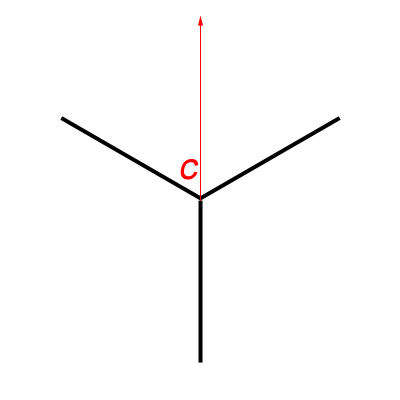
The camera (C) pointing to one of the legs directly

2. This alignment, means that we can start from exactly the same point, when the tripod is rotated for 180 degrees. All what we have to do is rotate the camera (and the VR-head) 180 degrees as well and we can start from the same point to do the second panorama. This angle of rotation, 180 degrees, is best in this situation because it guarantees that in the two panoramas, the 3 legs of the tripod will NOT fall in the same place or angle between the two panoramas. If any of the legs in the first panorama falls in a certain angle and another leg, in the second panorama, falls on that same angle, then our overlapping goal fails and the tripod leg in that specific angle can't be removed! (Make a mental image and rotate the triangle in the figure above to 90 degrees around its center).

The camera (C) starts for the second panorama from the same point as before after rotating the tripod 180 degrees (half a circle), and also rotating the camera 180 degrees to make it point to the starting point.

3. As stated before, it is hard to rotate the tripod from the hook on the top, because the legs would close down and I would have to stretch them back as they were before, and in doing so I will definitely loose coordination. Hence, I needed a method to align the center of the tripod in the same point after I rotate it with my hands. Unfortunately, this was impossible to do because the VR-head occupies the space and it was hard to align the center to the ground and put a mark there. I had to resolve the problem in another way, away from its center! Simply by noticing that a two overlapping triangles can form a circle, we can sort something out!

The two positions for the tripod for each panorama. The tips can be connected to form a circle.

4. Instead of aligning the center, we can then use the concept of the circle to point and predict the position of one of the legs when it is rotated. The best leg to be rotated here is the one aligned with the camera (this is the reason in the first place to align the camera to one of the legs). To predict its place after rotation, we measure the the distance between the leg tip to the center of the tripod (radius: r) and then count as much on the other side, and put marks on both positions (mine yielded a radius of 49.5cm).

The radius on both sides: the original starting point for the first panorama, and the predicted place after rotating the tripod for the second panorama.


5. That's it! After doing the first panorama (360 panorama) with one orientation for the tripod, I carried the tripod with both hands and aligned the leg+camera alignment with the second mark. At this point, I've rotated the camera 180 degrees to the back to start from the same point as the first panorama. This order is critical when files are managed by PTGui later on.

The whole process took around 45 minutes, excluding the time spent to adjust the tripod out of the bathroom, and adjusting the camera and lens settings as well. I tried here to use the hyperfocal concept to ensure that the whole range is in proper sharpness, because setting the fisheye lens to infinity here (as I usually do with normal panoramas) will make the floor closer to the camera blurred too much. The camera was finally adjusted to a hyperfocal at f/8. Simply set the camera to f/8 and manually rotate the focusing disk to fix the infinity symbol over "8" on the right side of the middle point. 

Canon 15mm f/2.8 Fisheye lens
Source: B&H

Then after, the struggle of PTGui begins. In fact, the stitch was not at all perfectly good but it was way far better than my previous trials! I'm happy for this despite the broken lines and the weird exposure spots and noise (say, even a normal panorama has those!!). The HDR images were prepared in Photomatix 3 instead of 4 to spare myself some headache. But later on I used version 4 for tone-mapping only.
As a beginning, I've decided to make use of the Blending Priority in PTGui before I begin aligning the images in the very beginning, and this option is supposedly only a numerical value that bears priority but nothing else, i.e. the number you put there is not entered in any calculations but PTGui uses this number to order the importance of the images and which to blend the most and the least (However, I tend to think of it as how much radius of the image is taken into). By default all images are given a value of 100, and as a starter for me, I've reduced this number to 50 for every image that has a leg from the tripod. The initial result was astonishing, and some tuning was done later on to some images to hide more from the legs or broken lines around the toilet seat, which worked as well (but not for the tripod leg which I had to clone later on).

Kackerlacka

In case you wonder about the name, Kackerlacka, it means "cockroach" in Swedish (yes, again). I just liked how it sounds, so I've changed the name from Cockroach to Kackerlacka!
The major fixes were done in HDR mode to hide the remnant of a tripod leg (above the bath tub) which is something I couldn't hide using Blending Priority option. I had to cut a piece from the adjacent walls and stick them there over the remnant of the leg. Also, some spots of colors were there, in HDR mode, under the washing basin and I had to clone these out too. The other fixes were done after tone-mapping the HDR panorama and majorly they were broken lines on the floor and else where, but I didn't fix them all. I was happy enough that my plan worked already and decided to give myself a rest from all the headache of fixes! Taking a row at 45 degrees upward was an idea, but I've neglected that for the time being because I do need to raise the camera a bit more from the ground. In my first trials with this panorama, the camera rotation when it was tilted, caused the setting's center to shift from its place causing more chaos when it comes to stitching! For the time being, this is enough, and might even fit a simple QTVR!

II. Moon on The Roof:
Spent Monday night on the roof trying to test some long exposure procedures. It was a hasty work really and no intention to make some art work out of it. I barely metered and settled everything on the roof (and forgot that the WB was set to K3000). However, with my fisheye lens not much can be done and lengthen the exposure time because I don't have the proper filters that fit to it. I wanted to use this lens specifically for the distortion and the wide view, but I might try to test my 18-55mm lens since I have a filter adapter to this one.
Anyway, this experiment was useful in some aspects. I've realized some problems and aspects that might be helpful for me in the future.
The longest exposure I could get was for 8 minutes, and for some reason I was not able to automate the whole process. I had to come back and forth to the tripod to do the exposure again, as I had some overlapping layers in my mind. To make sure that the breeze won't move the camera I've hung the camera back on the hook on the central column.

Night Photography: Finding your way in the dark

Lance Keimig in his book mentions a lot about the histogram and doing tests before doing the long exposure, but I have to admit I didn't do any of that. I was working in a haste. One thing though was proved as Lance mentioned: the heat produces more noise. The temperature was around 40C (~104F) and that definitely produces not only luminance noise, but also chromatic ones like if the ISO was not set to 100. However, the results were interesting indeed...

Falling Moon

In the beginning I've decided to work with DPP (Canon's software) because as, again, I read in Lance's book, the software of the camera manufacturer is best suited to deal with the noise recorded into the RAW file, while third-party editors, like Photoshop or Lightroom, do not identify this data (but they do give a way to clean the noise and sharpen the image). Long story short, it didn't work. It didn't fit my workflow and I made some mistakes (converting the RAWs to TIFFs in sRGB space) and DPP do not provide ProPhoto space (the highest space I guess was Wide Gamut RGB, which is still lesser than ProPhoto space). One thing though surprised me, sort of, and that was the "Linear" option in DPP. In fact, the Linear option, when turned on, did change the image into the "real" atmosphere that I was looking at on the roof!

One RAW slide before ticking Linear option.

The same RAW slide after ticking the Linear option. This how the sky was in real.

Anyway, I didn't want things to go the normal way, so I followed my old routine with Photoshop. Fixing the WB made an interesting blue sky, the only thing that was missing is a long line made by the moon. However, since I had shot several exposures, I wanted to overlap them. It was not an easy task and the auto-blending in Photoshop didn't help me much so I had to do things manually, and that was awkward! All in All, it was a struggle against the noise and I tried to make a trade between details and the noise...

Luna Cadit (Falling Moon)

Another surprise was waiting for me in this scene though. This little surprise was a delicate one, that with some noise cleaning it just disappears. My place is in the middle of a urban area and of course in such places, it is hard to see stars. Seems, however, this is not the case always...

Click for enlargement to see more clearly.

I think I can learn now for sure that the longer the exposure, the more lights from the stars can be in even in a busy area with so much light pollution like the city. But, this is not an excuse for not going to the desert or any isolate place to take some star trails. I'd love to do this one day, if only I got the means. Hmm, maybe light painting is my next target? Who knows...

III. My Busy Schedule:
After managing some aspect of panoramas in the past 2 weeks, specifically in the Kackerlacka and Asylum panoramas, and looking at the knowledge gained in the past weeks specially about what is related to the Blending Priority in PTGui, I've decided to go for another round and do a panorama that was done some long time ago (and probably in a time when I didn't have even a VR-head). That is a panorama in my office, including myself in it.
I've learned my lessons already from the previous trial, but I never thought I would be doing it again. One of the critical things in such panoramas, and because I have no one to help me out as it should be, the scene must be STATIC. Yes, in bold. A slight movement can screw the whole scene for you. In my case now and with my new trial with this, I did face further problems, as I do with any panorama, yet, I did fix some aspects that did make troubles for me before. I learned new lessons as well this time too!

I'm Busy

I won't go and talk about the nadir point this time. I guess, if you were following the past posts, you know already what kind of headaches involved here and that's why this one is cropped from the bottom (yet, a QTVR can be done later, and this is what I'm thinking of).
The panorama was done completely in the beginning (including taking the nadir and zenith points) and then, carefully without moving the tripod, I've tilted the camera down 45 degrees (because on the couch, my feet won't be showing if the camera was not tilted down). After putting the camera down, I've decided carefully for my places to sit (or lay) and I had to do this VERY slowly to avoid moving any object (and holding the wireless remote of course). I've added myself three times in three close positions on the couch and this was a mistake. The couch stretches and changes its shape when you sit on it, and this is not good for the stitching process and I had to sacrifice this appearance and drop down two slides for me sitting on the left and right. Attention to such details is a MUST.

Playing around with Blending Priority (raising and lowering) was fine in the beginning until I discovered after the FIRST stitches (I made already 3 projections of this panorama) that there was some "blending errors". Some portions of me disappeared (knees of me sitting disappeared and the elbow too, and in other places). Trying to fix these errors in Photoshop was not a good idea. Hence, I've went on and tried to change the blending priority again for several slides and here, I had to do some trade off: when I increase the blending priority for really important slides (mainly those I'm in) I will be ending up with broken lines. I've decided to do it that way since broken lines are, relatively, easy to fix in Photoshop.


The settings for shooting this panorama were critical, mainly the White Balance (WB). In many occasions and many times, whenever I go around my work place shooting under various lights, I always end up with a problem deciding what WB I should use, and henceforth, what color temperature to put when I tone-map my HDR images. This time though, I've decided to go on with a simple test. Since the wall in my office is supposedly called "white" then, why not use it as a Custom WB? Simply, I've took a picture of the wall under the current lighting conditions and configured this image as a custom WB. They say though that it is more accurate to set the WB using a 18% gray card in the location but I think I've made the right decision here, and when it was the time to tone-map the whole thing (after heavy editing in Photoshop) the picture was majorly neutral and natural, and all what was needed is a bit of blue hue to be added (by putting the color temperature in Photomatix down little bit). Although you can set the WB manually later on when you edit a RAW file, but you always see in books some advises about the importance of doing the right WB in place. I think after this experiment I can say it is completely true. Many times when I take pictures from my work place, the WB was hard to be decided for, and usually I would end up with too much bluish images or with purplish ones. Here though, I made use of the Av mode and not the (M)anual mode, since it was so hard to decided for an intermediate shutter speed between highlights and shadows. The difference was vast.
Beside the corrections in Photoshop for the stitching errors, there was also a minor edit to put up the exposure value for the whole scene while putting down the Exposure for the light sources and window. This is my usual way for emphasizing the details in these areas (although the light sources, when blown out, can be attractive as well).
____
After all of this fuss this week, I'm really wondering where am I going? Seems that the more I work with my camera, the more I get isolated, somehow. I still have some ideas to do with my camera but I didn't have time to do them this week, and probably will work on them soon by next week, and until the time comes, my mind will keep being busy with daydreaming, keeping me a dead with open eyes, and imagining how things would evolve around me in a reality that will never happen. I can hear it now going... tick... tock... tick... tock... ... ... tick ... ... ... ... ...


Thursday, August 4, 2011

A Struggle...


A week messier than the one before! Frustration, vexation, a heart attack, name it whatever you want. Any term that gives a resemblance to "annoying" would work perfectly here.
I've been trying so hard to do things prior to this post to be able to put some work, but I kind of failed, but hey, I tried! But the thing I'm regretting the most is, not being able to work on a simple task as recording my Ayvarith texts.

To start with a failure, I was trying to take a panorama on a low level. The new tripod gives me new and interesting capabilities (and yes it is made in China), and for this I was trying to work with a panorama in the bathroom, again. The location is chosen for a certain idea that I wanted to imply, however, there was one difficult task to come over (and I couldn't); The tripod legs. Simply, impossible to clone out, unless of course I would decide to work for one full week on cloning them out. Despite my trials to rotate the set from above and take the panorama again with the legs of the tripod out of their former place (and then overlap the 2 results), yet, that didn't work quite well and PTGui didn't help (nor Autodesk Stitcher which I don't know how to use still!).


The setting in the bathroom!
The floor is clean don't worry! :)


Another work had to be done in my work place. Now it's Ramadhan and the working hours are shifted and shortened generally but however, I'm still on my same routine. Not affected and hope to remain like that till the end of the month. Anyway, I try to finish whatever I have to do in the lab by the early hours of the morning just to do whatever I like the rest of the day. If only I can bring my PC to work to do something about these images and panoramas!
Last week I did take a small vertical panorama for the corridor but when I got back home, the process was hard to be done and to stitch, hence, I decided to go on and do it again last Monday but this time, a full spherical panorama. I think I got my lesson now from all of this. Always go for the full and then part whatever you want.

Branches
Despite the fact that it's not a full spherical panorama, this vertical panorama taken from under an arch of bushes and then cropped. I realized that I almost done a full panorama here minus some few angles.

- Struggling With Failure:
Back to the main headache of this week for me. A panorama from my work place, and specifically from the corridor of labs. As stated before, I took a limited panorama from there before but I was mistaken not to make it a full spherical one. Also, this time I decided to take the whole panorama with (M)anual mode instead of the (Av) mode as I usually do. In brief, the process is about metering the highlight and shades in (Av) mode to check the shutter speeds, and then choose an average shutter speed in (M)anual mode, and that way you will make the exposure time to the camera more constant time-wise, making for a smoother transition, as it seems, as you move your camera while taking the panorama, from highlights to shadow areas. On the other hand, the WB was set manually to about 3300K, instead of relying on the presets of WB that already exist in the camera.
This time I tried hard to take a shot of the Nadir point but things later on were not that easy either. I've been struggling hard to achieve a suitable blend but seems I need more work with my tripod. I went through much fluctuating between Photoshop and PTGui trying to fit the Nadir point in its place.

Nadir shot taken after moving the tripod away from its original place. Not a good shot!


The idea in fact is simple, and I've read a lot of documentations online and from the PTGui help so that I might fit the Nadir point perfectly. The idea is simply to stretch the Nadir shot which I took from an angle (after changing the tripod position) into its place on the completed panorama. This simple idea, was not simple to do at all!

Asylum
Vertical panorama.

As a brief discussion for the colors; here I tried to add a dirty look resembling asylums and places of maniacs that we usually see on movies and such stories related to psychos. My main interest, in general from the very beginning, is the linear shape of the corridor and that is what drove me to do the panorama (twice). Yet, when it came to the tone-mapping and fixing colors, the philosophy in the mind begins. Seems I do have a certain pattern of thinking when it comes to such workflow: Notice, Shoot, Add philosophy with colors.
Back to the nadir, here, you can see the middle block in the vertical panorama is totally covered. Not perfectly covered though but compared to my other trials, this is considered superb, I guess.
It turns out that my VR-head, Manfrotto 303SPH, is not one of the best VR-heads available. Not because of its weight, but probably because of its size. By coincidence and as I was surfing the net to find a solution to my nadir problem, I've discovered that MY common problem of having parts of the VR-head into my shooting process is in fact, normal. Other people who used this very same VR-head did suffer from the same problem, and if you are not going to make a QTVR, then this should not be a big problem; a simple crop would do the job.
Yet, my main problem is, I insist on doing this and I wanted to add a nadir point to make a suitable QTVR. There is always, however, an open option for me to create my own nadir which is something common as well: a title block.
In the processes that I've been through, which were so complicated and so memory-exhaustive, I've learned many things for now, but that does not compensate for a good nadir shot. There are methods mentioned on the net for such way to shoot the nadir, but lot of them are impractical. I've learned some new options in PTGui that are said to be helpful for nadir stitching (like Blending priority) but they were useful for other ideas in my head. After all, I've managed to stick a fixed and isolated nadir (from an original angled shot) which did not fit perfectly, but yet, to me it is a glance of hope...

Asylum II
The isolated and fixed nadir was way larger than the piece I wanted to cover.

One of the problems that occurred here while stitching (or after actually) is the weird splashes of colors that are not originally there. There had been some odd blue bands, and you might see them as well even after cloning (never been good with cloning!). I'm not sure what causes such weird colored occurrences, but it might be the process by which I took the panorama or the effect of the original WB? Thinking about it now I really can't decide how to research this topic! And to add to the drama, Photomatix is still acting weird for adding white spaces to perfectly aligned images!
Finally, there was this simple QTVR (I didn't do QTVRs in some time now), in which I've forgot to turn on the option that says "360 panorama" when tone-mapping in Photomatix. For this reason you might notice a sudden change in shades as you rotate in the QTVR. You need the latest QuickTime plugin to see the QTVRs on web. If you downloaded QuickTime and installed it already, the plugin is supposedly installed already...


The final twist to the epic of such panorama is, a tunnel view. I was going to make a little planet projection of the scene but it turns out that it does not make much difference to the vertical panorama that I did before. Thus, a tunnel view projection is more interesting I'd say!

Asylum (Tunnel View)

It was a struggle indeed. Made some advancement and got some failures as well, but let's hope I did learn my lessons here. Originally, the images were stitched on relatively larger sizes (not relative to what you see here but to what have been submitted to stock sites), but after all I had to compromise and give up some space to have mercy on my PCs memory.
All of this work got me back to a spark of memory in my head, when I used to be an active member somehow in the Wild Minds network; a network dedicated to Maladaptive Daydreaming (MD). The vertical panorama specifically, which was the first in this series, got me back to myself to realize that I didn't do much against my MD habits. The ups and downs in my life got me even deeper into this. Getting closer to 31 in few days does not make it any better as well, as socializing is already harder for me to do. Maybe I should get back to the network, to people who are, to some extent, like me... just wondering where to this is going...

Salute, to such a hectic week, with a little dedication inspired from the essence of the strokes of bad luck during this week...

Busy Life
Long exposures (25") layered  with "soft light" blend.