Showing posts with label photomatix. Show all posts

Thursday, July 18, 2013

Dilemmas...

Here we go, and as expected. Ramadhan has arrived and the unneeded stress started along. There is never enough time to do anything. Majorly, the main problem is the after-work nap which takes from 2 to 3 hours and sometimes even for 4 hours, and that makes me awry at night and unable to sleep early as in regular days. People in Ramadhan do indeed make a time shift and sleep late (because working hours are also shifted as well) but for me, I always try to fix my sleeping time as in regular days and never stay late unnecessarily. Now, I need to do that more than ever because Mom's dialysis timing is not changed and I do have to pick her up to there in the same time as in regular days. Moreover, I have to make her something to eat before leaving home (while we used to grab something on the way in regular days). In Ramadhan, it is insulting (and illegal) to eat in public while the whole nation is fasting. Well, we do have a medical permit or reasoning, but still, no need for embarrassment.
I've been to the doctors to check up with my nose and see the reason for bleeding. He said that the capillaries are probably weak and I need to have more vitamin C in my diet and provided me with some method to stop the bleeding as well. Finally, he said if that didn't work, then I have to go back to cauterize, probably by laser (?). I think in this week alone, I've lost a quarter liter of blood just through my nose!

The Dilemma (1)
This week I've been working on an idea for a panorama (and barely did) which I've been cooking in my head for a while. However, unfortunately for me, I'm having technical issues and a sluggishness in my skills. The panorama was taken twice in two different days, and two different lighting conditions, and with two different techniques.
In the first trial, in order to fix the bracketing for the HDR merging later, I've used my light meter and measured the light (incident) from different angles to the camera. There was a considerable gap in the EV values. In the beginning, the expansion of the bracket was from -2EV to +2EV but apparently that some shots were somehow dark and the +2EV shots appeared as if they were taken at 0EV instead, thus I've started all over and made the expansion from +3EV to -3EV. However, the story was not over here.
In the current time and because the memory issues in my old PC, I've decided to work with my (new) laptop as I'm still preparing my new PC before plugging it online completely. Sincerely, I'm so lazy to do all of that and it's connected to my TV at the current time; Not a pleasant view and my room is a mess. However, in my laptop and after merging the RAW files into HDR slides and trying PTGui to stitch them out, it turned out that the slides were apparently dark and PTGui could not find control points at all!
This matter triggered me to do another trial and this time, instead of working in Manual mode and taking light measurements, I've decided to go back to the old methods (tried and true!); Working in Av mode and letting the camera decide for the shutter speed, and I had this occasion to increase the f-number from f/8 (as in the first trial) to f/16, to make sure than things are sharper.
The reason I've decided to do a second session is the assumption that the dynamic range was so wide that PTGui could not assemble some control points in between any two images. However, even in my second trial, Photomatix and PTGui followed with the same behavior: dark slides, and unstitchable panorama. After many trials to install and re-installing older versions of both programs, I've finally came about to some solution and finally the panorama was stitched.

Wooden Hall (trial stitch)

I've spent several days trying to figure out what was going wrong with my (usual) procedure and why things do not work out in the laptop as they do on PC. The panorama above, Wooden Hall is just a trial and not a final image to be submitted to stock sites because of the weird (and usual) blue spots, but I've decided to put it online anyway without any fixes and ask for help about this matter, if there is any available! I'll try to summarize my thoughts here in points:
  1. Apparently, the main problem was in Photomatix and not the (new) PTGui. After installing several versions of both, it turned out that Photomatix v4.0.2 yielded clear HDR slides that are viewable easily in PTGui (any version), but the new version (v4.2.4) was problematic. I'm not sure why this is happening but there were already some issues when I moved from Photomatix v3.0 to v4.0, like the ability to tone-map without opening the HDR slide - a problem I used to encounter with large little planet panoramas, and my way around it was to set the values in v4.0, save the settings and use the side-cart file (the XMP file in which settings are saved) into v3.0 using the batch process facility. The thing is, because of the large file size, v4.0 used to give me a memory error and stops responding when I try to process the tone-mapping at once. Why don't I use v3.0 to tone-map already? Well, it turned out that v4.0 has a better on-monitor representation of the actual image after the tone-mapping is done. When tone-mapping in v3.0 (as far as I remember), opening the image in Photoshop later would yield a completely different image in terms of colors and shades and I would have to work around this with adjustment layers. The situation here is somehow similar in between v4.0.2 and v4.2.4. Advice: Don't always jump on newer versions of any particular software. It is good to try new stuff but always make sure you will be going smoothly with it. Keep older versions in store somewhere, as you might need them at any time!.
  2. The new PTGui (v9.1.6, and I think v9.1.7 is out there) has lot of interpolation possibilities, more than I had in the old stuff in my old PC. Interpolation is the way that a program would interpret or "read" the pixels across the image. The three basic ones were Bilinear, Bicubic, and Nearest Neighbor. Each one of those of course got a specific usage (some of them are explained in Photoshop resizing facility), but in PTGui there are no descriptions about any of them. In the new version, however, the list is expanded further to include Lanczos and Spline (with each one of those got several types). Speak about new stuff to learn and burn the time with!
  3. I've merged the RAW files several times and stitched the panorama several times (and thanks to my fast laptop, the stitching process takes merely 5 minutes for a 10,000x5,000 pixels panorama!) as I was trying to figure out the reason for these blue streaks across some regions in the panorama. My conclusion is (and I've done that before actually) it is more related to the color space, and it might be related as well to some gaps in the dynamic range of the HDR slides; I'm not sure yet. However, merging in different color spaces and stitching the panorama after, proved to me that the blue color spots (you can see them in the image above) were reduced significantly (in saturation let's say) when merging the HDR in a lesser color space as sRGB. Also, the streaks appear more or less around regions were there happens to be some stitching errors. Stitching errors cause such problem? Color space? Dynamic range? All of them? Not really sure, but it is surely annoying. I couldn't edit the panorama and fix it in this laptop mainly because of the size of the laptop and my sluggish movement with it and the display is small already. Thus, I've decided to upload it as it is and might try to fix it later when my new PC is ready.
My world is spinning right now and I have to finish up with this PC and try to hold to my camera again, and work with more panoramas even.

The Dilemma (2)
Well, this second dilemma is somehow to a lesser degree. It is just a dilemma about Geltani and some aspects about it. I've been working a bit with the sounds that are to be used in Geltani and I've figured out that it is almost impossible to avoid repeating some sounds. I've decided here that it is time to introduce some sounds that are unfamiliar to the far east in general, thus giving a touch to alienate the conlang from a typical Asian sense. With these new sounds, like the Arabic ħ [ح], I've decided to add some possibilities for creating dual-consonants and doubling (or stressing) some. Even with those creations, it is impossible as it seems, to provide a distinctive sound for each combination of leading and driving couplet. Would there be two words with similar sounds and different meanings?
In that sense, the scenario would be a mimic of reality of the far east languages, and specifically Chinese and Japanese, where is typical to find one character with several pronunciations and even meanings. However, I don't think Geltani would be close to that level of complexity of the real languages, but it has a comforting effect to think that having a repetitive scheme of sounds for different types of couplets is not really a bad thing, and it somehow mimics the real world to some extent. The characters (or logograms) would be definitely different if, at any chance, two words or more bear some resemblance in the sounds. The question now is, on what basis I should base the driving sounds?

Finale
David Schap's book is over with right now, and I'm trying to find something to replace it with from my arsenal of old books. As I've mentioned before, probably I would go through my old languages books.
Many ideas are racing through my mind right now, like having a leave for the rest of Ramadhan just to have my own timing and not to worry about work and waking up in the morning, but Mom's dialysis schedule holds me back from this idea, because the center is near my work place and eventually, the torture won't stop (but yes, I would have more time for myself).
Because of all this pressure, in the work-front and the home-front, all what I'm trying to do right now is to break all the cuffs and find a way out of obligations to work with my own projects and my camera. Feels like being married without a real partner, I guess.
Also, I'm trying to consider some way to integrate myself through the group back again, but without the work load that I used to get. Probably my membership would be changed from special to regular because of the low activity level I'm participating with. There is also a crazy idea cooking in my mind: to write a book in Arabic about the basics of photography. This idea arrived to me looking at the arsenal of the photography books that I have that are all in English, and many people here can't have the benefits of such books despite their love for photography because their lack of expertise in English. It is such a sorrowful thing that a language can stand a barrier in learning. Not sure this idea will go further but it is worth considering anyway!
I'm typing this post and watching TV in the hall, with some show about the Canary islands; It makes me dream of vacations and traveling again. I want to see the world again out there... if only I can find someone to take care of Mom as much as I do...


Thursday, November 1, 2012

Ready, Get Set, Go!

Here we are back again to the homeland, after a tiresome trip back and fro. Surprisingly, my friends in Staten Island told me that once I've left New York, the whole weather got screwed up, and now they are waiting for some hurricane! Luck? Maybe...

I had many ideas and many reflections since I was there and till this very moment in fact. So much that I have a problem organizing my thoughts. Life, going on, societies and dealing with people - and of course the world of Photography.

Even though it had been days since my arrival back home, I think I still have some sleeping problems. Awake all night and sleepy at daytime, and would that help to work with the camera at night? It should, but I'm too lazy to do so!
Anyway, as soon as I settled down, I've plugged in my external HD and started to work on arsenal of photos. Even though my new laptop is relatively upgraded and faster (with 8GB of RAMs) yet working with my desktop PC is a must even though it is slower. However, during my stay I've used the laptop to create small panoramas and other still images, mostly in black and white.

Meditative Cleve
Of course, one of the first things I was handling is the matter of the panoramas, specially those that I've promised to send as a gift. Meditative Cleve for one, was down experimentally with my laptop during my stay just to check for the level of the light (and back then it was a Little Planet projection). After arrival though, I worked on a bit more to achieve the HDR panorama I'm seeking. My experience now says that even though PTGui can link images and achieve a HDR panorama directly from the RAW files (specially the new PTGui) but apparently it is still better to work with HDR files (i.e. HDR slides prepared with Photomatix for example and plugged into PTGui). This way, the list of the images is shorter and easy to handle the various angles (instead of dealing with more than 120 images you will be dealing with 40-45 images). Also, many problems concerning the exposure overlapping and the exposure curve - and some errors or smudged areas because of that - all of these problems are reduced when merging HDR files instead of single RAW images in PTGui.
In Meditative Cleve there was a tiny a problem during the shoot and that was after shooting the full panorama, I've asked Cleve, my friend's hubby, to take a pose. Because the altar was close to where I stood with the camera, I had to adjust the tilting angle to -30 instead of the conventional -45 degrees that I usually use in my workflow in every panorama. Only at -30 degrees, I was able to include the whole body of Cleve in one shot - otherwise, I would have to take several shots and tilting in different angles to include the whole body. Funny thing that later, and after one long day working on this panorama, I've realized that there was a blending error causing Cleve to lose part of his head and his right shoulder! And then, the work had to be done all over again with adjusting the blending options and then hiding the traces of my tripod again.
Because I didn't take all my equipments (naturally!) the nadir point in my panoramas are hard and easy in the same time. Easy because I don't have to worry much about it - I don't have the tools with me! But hard because working around it is a tough one specially if I want to achieve a QTVR.

The Victorian B&B Lounge

The easy way around this nadir problem is the typical logo and title at the bottom, or, rendering the QTVR file with limited vertical viewing angle (tilt). However, because the lower angles do show some pieces of the tripod head, I've decided to adapt to the logo approach to hide these traces as much as possible. Now, I end up doing a double file for flat panoramas, one with a nadir point to plug it into the QTVR machine, and a cropped one (like the one above) for regular viewing and printing.

QTVR

In this travel I did take a lot of panoramas (relatively) and working on them will need some time. For the time being I'm just checking my chances for flat panoramas and QTVR as they are a priority to send as gifts as promised. Even though panoramas like Meditative Cleve is done in a vertical form, but rendering the QTVR is easy once the stitching file is saved and I will get back to it surely - but I'm hesitant if I should include Cleve in the QTVR or not (remember that I do have the full panorama without Cleve originally).
Anyway, here you can find a QTVR done for the Victorian B&B lounge and I have to say that I do really like the place and its simple architecture. Comfy, and not so complicated. Don't forget, you need QuickTime installed!


This QTVR is also available on a large file with 800x600 window which I plan to send over in a CD to my host, Danute Garlach, along with a print of the same panorama. Anyway, since I did take some panoramas outside, I don't want to rush and I need to check which panorama would work best as a gift.

Well, This is just the beginning now with this post. I'm trying to head back to my usual routine of posting every Thursday. I've done lot of single shots before leaving New York and after arriving back home, but I don't want to put it all in one basket.
The engine needs greasing, with hope now, I will start a new approach to life after this travel. Not sure how, but I need to knock down the clouds of melancholy and depression. I have to...

Thursday, May 31, 2012

Cephalargia...

If it wasn't for the frequent headache that have been striking me now and then from the beginning of this week, this week should have been fair deal with me. I've started this week with a severe headache (or migraine, call it whatever you like) that almost kept me paralyzed, but even with that I went to work on Sunday (weekend: Friday, Saturday), and didn't feel like going to work on Monday. This break from work in fact allowed me to do many things (since I've been awake in the morning). I think now, I do need a vacation just to do my own business!

I've started now recording the 6th chapter of Alexander's story, and in hope that the engine won't stop. In average, I'm planning to vocalize 4 verses a day, if possible. The break I had on Monday made me do lot of things, including the recordings, and also some images and panorama preparations from my session on Saturday (will discuss below).
The vocalization is now available for verses starting from 121 to 432, here. Of course you can always refer to the English version here, in the same website.

I. Scientific Center Workflow:
On Saturday, I had to push myself out of bed and head to the Scientific Center; a plan that I've been delaying for about a month or so. This trial now is different, specially with my 2 relatively new lenses compared to the last time I've taken pictures from there (April, 2011). After some negotiations with the receptionists I was able to get in. The difference here, beside the lenses, I went in with my VT-head and tripod. Heavy sum of tools that I had to carry through the corridors, and actually beside the panoramas and few simple shots with the macro lens, I don't think I needed the tripod after all.
One of the mistakes that I've made here is to bring the ball-head for the tripod instead of the pan-head. Despite the theoretically-easy movement of the ball-head, its lock system and fine-tuning for the shots proved to be a failure. I guess I will always stick to my old pan-head; it is easier to control.

Velbon pan-head (owned)
Source: B&H
Inside the aquarium, I've been mostly using my new macro lens (100mm) which works well as a telephoto lens as well. There were few instances where I would have changed the lenses for some particular locations, but the main lens was the 100mm.
The new lens has f/2.8 which theoretically works better in the darkness rather than lenses of f/5.6 and f/3.5 (that is, the maximum aperture). However, that did not avoid me from using high ISO ranging from 800 to 1600 at some instances. In fact even at ISO1600, there were problems following some movements and most of the images were blurred, which is normal in my case.

At some points, certain points, I've used my 15mm fisheye lens, to take panoramas of course. The panoramas were hard to take, and at a certain point I had to wait for 45 minutes just to shoot a simple 360 panorama. At the end, and with my last supposed panorama, I had to stop in the middle of the process after the arrival of some people, who eventually did not have any intentions to budge. Some panoramas, like the last one, was done in single shots in order to finish as soon as possible.

Aquacurvatic
Rokinon 8mm fisheye f/3.5 t/15 ISO1600
 One of the earliest shots to be processed was the shot taken between water tanks at the end of the aquarium almost. The play of light was enough to catch my eyes, but I had to wait for a significant time just to get this shot done (I think 15 minutes). I've taken this shot in portrait and landscape orientations but at home, I've realized that the landscape orientation fits better for showing more curving, and also for the planned DxO corrections. Starting from this image in fact, I've made up my mind for a new approach and a new workflow, specially when it comes to pictures taken with high ISOs.

Pengo
Canon 100mm f/2.8 t/160 ISO800
This approach involves using DxO first as the main RAW editing tool, followed up by using ACR for final touches. I realized that I might do better if I reduce the noise levels gradually. First by DxO (beside editing other aspects like contrast and saturation), which has ready-made profiles for a wide range of lenses and helps with reducing the luminance and chromatic noise significantly. Starting from this point of automatic correction (if available) I would reduce the amount of correction leaving some noise left in the image still. Finalizing the edit, the file would be saved as DNG (Digital Negative).

Fish Profile
Canon 100mm f/2.8 t/25 ISO1600
ACR has some advantages over DxO, as I believe. On one side it has easier controls, and it has direct editing tools on the other hand. DxO is complex and good, but sometimes you need simple touches like fill light to just add the right amount of light in the shadows; something you can struggle with somehow with DxO. Also, in ACR editing, the color space can be assigned directly, while in DxO it involves loading profile files and save it to the file. For this reason, I never assigned color space while working in DxO, but only when I open the DNG file in ACR.
The workflow continues with reducing the luminance and chromatic noise a bit further in ACR too. The sharpness amount is not touched though. Finally, a final noise reduction is achieved using NeatImage or Noise Ninja. Noise Ninja is preferred though since it can make a profile from different spots in the image and also the sharpness can be controlled easier than in NeatImage.
This lengthy workflow might not be practical in sense of speed but it did yield some good results I think. Also, it cannot be done for HDR processing. Aquacurvatic itself was originally captured in brackets for some HDR processing but I realized one of the slides was enough to achieve the desired look.

II. Too Cool?
Ever had an image, that after the first step of processing, you just find out that the image is so good that you just don't know what to do about it or how to process it because of the many possibilities and the racing ideas in your mind?
At least I know this is what was happening with me when I reviewed and tried to correct an image of a horned viper from the Scientific Center. The image was taken with Fluorescent WB (and mounted on tripod). Turns out that the image came out bright and not as contrasty as I hoped. With simple correction to the WB, the image became another story and I've realized its potential for different settings. However, I limited my editing to two versions only.

Tarnung (disguise)
Canon 100mm f/22 1.6sec ISO400

Tarnung - BW

The black and white version specifically was delicate to achieve, with many contrast and level adjustment layers to achieve the look. I thought of adding a tint of light blue to reflect a silver-ish look, but that would be even another path, another story.

III. Pano Pano:
As I've stated before, I took the chance inside the Scientific Center to take some panoramas. Not all of them are good I have to admit, since lot of visitors were there and in some places I had to work as fast as I can, but I did have some peace in one particular location despite the visitors: The Greenhouse; as I call it. It is the place where the penguins are and some birds are left to fly freely beside fish tanks and snakes, and some green cover. It looks indeed like some tropical forest, but with controlled air circulation!

Greenhouse #3
When stitching this panorama, I've tried to get out of the conventional box of certain ideas, like doing a vertical panorama using a flat spherical projection. Instead, I've tried the Mercator projection and converted the image into a vertical upside down panorama.
The main reason for this is that the empty space in the middle (or the ground where I stood) pushed all the interesting features on the side and a flat spherical panorama done vertically won't give much attention to such details (while stretching this space in the middle and make it look like an ellipsoid). Tone-mapping, on the other hand, was done in a simple form and not depicting any dramatic emotions, but I've tried to convey a natural feeling to it as much as possible (by using the Compressor option in Photomatix instead of the DetailEnhancer).
I've stitched this panorama 4 times, each time in a different projection style. I'm planning to present my work to the people responsible for the gift shop inside the center, in hope that I might get a deal out of such images if possible. As for now, I have to prepare all my papers and pictures before calling the main principle.

I've made simple stitches for other simple panoramas but did not proceed with processing. Some of them would be hard to represent, specially those captured in single shots and not in HDR. Yet, there is at least one panorama that is not touched yet at the time this post is written.

IV. Trends of Business:
Till this very moment I didn't hear anything from the Marina Mall desk which was supposed to call me back (after an optimistic conversation). However, and because I've been busy with other tasks, I didn't try to recall and check again.
The latest for me now is that I've been trying to make a layout design for a request paper that includes some prices for some services. Still not finalized, but the major aspect of it are set. I think I do need some help in creating this form (and also a help to measure its legal consequences).
On the other hand, and away from this request paper that I'm trying to create, I'm preparing a set of images that I've taken from the Scientific Center in order to make some sort of a proposal (in a form of a wholesale) that they might be interested in. The idea is to offer posters of some sort as a souvenir item for visitors, but that depends on their views and whether they think visitors would be interested in such an item or not. One step at a time...

This is some of the work done this week, and yet the image processing is still on its way and more to come. I didn't even put everything I've done here.
I do want so much to write some poem but my feelings are swinging so much and the work load is over, making it hard to concentrate on proper words.
Yet, I do ask myself, what's the worth of all of this... ?


Thursday, September 22, 2011

360...

A fast paced week somehow. Nothing new on my camera level except of visiting a mall with my class to do some practice, but otherwise, no new panoramas, except of working with old ones. I keep looking at my Ayvarith papers and my microphone connected to the PC and ask myself when I'm going to work with it. Hope soon. For the time being, there are games on my list I need to finish. Games, are important to me. For the time being I'm trying to finish a game called Gray Matter. A nice one with sci-fi theme and magic stuff; oh, combined with some psychology as well! After that, I'll be in hunt for Jonathan Boakes' games Bracken Tor, and TLC3. These corners of the UK that really need a visit one day. Mystery, is what keeps the mind alight. But I might not be able to play all those until the time of Hajj comes, by mid October. I'm busy, somehow, sorting my schedule and my leaves to do the pilgrimage. My work place is somehow giving me a headasche for the time being with their stupid laws and regulations.

I. Failaka Re-Visited:
Under the light of considering further possibilities with panoramas and changing the viewing angle, I've re-visited older panoramas, and specially the one for the "Ghost Bank" taken for a deserted bank building in Failaka island back in November 2010 (after my return from Ireland).


Ghosts Bank

This time the twist was for other projections as well, which I've never thought of back then. Anyway, the tone-mapping is quite different of course. I knew beforehand that Photomatix will give me a headache with some errors related to the size of the final image, but after all I didn't make it smaller and went on with it. For some weird reason, when Photomatix v4.0 encounters HDR images as large as 8000x9000 pixels, it would give an error for memory issues. Doing a "batch single files," which does not require a visual examination, would still not work. Photomatix v3.0 on the other hand, it might show some errors related to memory limitations, but batching single files would work fine (and of course takes a long time). For this reason, the planet projection of this Ghost Bank panorama was tone-mapped in Photomatix v4.0 in the beginning, and the tone-mapping parameters were saved, then loaded into Photomatix v3.0 and the HDR image was tone-mapped accordingly in "batch single files" process. I don't know what's the deal, but it might be a time-consuming process.

Dark Aspect

One of the aspects of this panorama is the fact that I was working with the monopod. Shaky, but with cloning out the remnants at the end, not much of a headache. If the monopod was raised to a low level (to the level of my chest almost) that approximately raises the VR-head and the camera to my chin level. At this level the shake might not be so apparent (but there is some of course). I had to use back then because I didn't have the appropriate tripod.
The second venture after this was a vertical panorama. I made a mistake here but might be considered a surrealistic look after all.

الحلم الكئيب
The Gloomy Dream

For some reason I just named it in Arabic. However, the viewing angle was tilted and hence the tilt on the top part of the panorama is apparent, and that, caused me to name it a "dream" because it has some surrealistic look.
This vertical view was cropped (typically) from the sides and the edges to remove the remnants of the VR-head and the colors were altered a bit by adding a Photo Filter adjustment layer before tone-mapping the HDR. The Photo Filter was Deep Emerald, to give a creepy look. Also there was Exposure adjustment layer to pull back the exposure values accordingly to the whitest spot in the place (the entryway at the bottom).
Maybe the most beloved aspect (point of view) for me was the WV or the Wide View angle. I had to work a bit with adjustment layers a bit before tone-mapping in Photomatix.

Cold Alone


I had to crop little bit in the beginning just to bring things to the center a bit. In this image, and instead of fighting back against the purplish hue (because WB was set to Fluorescent back then) and make out the whole thing in vibrant yellow and red, I've decided to move to the next neighbor of purple; Blue (remember the rainbow? ROY G BIV rule?). In my work with HDR slides in Photoshop so far, I've rarely used the Hue/Saturation adjustment layers. Most of the color adjustments were done actually by Photo Filter adjustment layer. I find it giving more realistic looks and adds to the color instead of shifting the color. That does not mean I don't use Hue/Saturation layers, it is just I don't find them useful all the time.
In Cold Alone, and after fixing the Exposure as usual, I needed two Photo Filter adjustment layers. The first one is to add the general bluish cold look to the whole scene. In this layer, I used a layer mask to remove this effect from the yellow-reddish ceiling here. The second Photo Filter layer was added to increase the vibrant color of the ceiling (by using one of the "warm" presets) and also using a layer mask with it, but of course it is the inverse of the previous layer mask used before (just a copy paste of the layer masks). Weirdly though, in HDR mode in Photoshop, you can't use the inverse command (not from menus nor with the short cut "Ctrl+I"). To do the inverse of blacks and whites, I would use the Levels command (Ctrl+L) and flip the black and white arrows at the very bottom of the dialog box. To avoid any fuss, I would remove the black arrow to the middle first then the white to the other end, then push the black to the place of the white arrow. Sometimes it becomes so hard to know what to click when the two arrows overlapping each other.
Just imagine the blue ink you will be losing for printing such an image!
For the time being, I'm considering visiting Failaka again, specially that summer is on its way out, but I can't decide which time. Since I'm preparing for Hajj journey, I might not have the needed time yet to go there. It would be nice to take a tour with my camera on video inside the car like I used to do on the mainland. We'll wait and see...

II. 360:
Last Sunday it was another workout session with my Photography class. This time we headed to a mall here called 360. As you might have inferred from the name already, the mall is circular in shape. I spent around one hour and 30 minutes trying to find that place, moving from one jam to another.
Architecturally speaking, I didn't find much of interesting in fact. Although we had the freedom to go into shops to take shots from there but as it is with me always, I hate to contact people or ask for permission, so I got stuck to my ground; roaming around the mall trying to find some interesting angles. We had around 2 hours of time but personally I spent only one hour or so and decided to head back home before the darkness hovers over. However, it was a spark for an abstractive mind. I had to bear little bit with annoying people as usual, but the main point in the whole practice, as I think, is to learn how to concentrate in the middle of a fuss (quite the point if you are a journal photographer).
Although most shots were taken in bracketed exposures for HDR later on (except of few ones taken in long exposure), but a lot of those were uploaded after some processing in RAW then converted to JPG.


These are some abstracts, and there were plenty of others that I just need some time to reflect upon. As I said most of the images were uploaded directly after processing the RAW file, but there was a trial at least once for a HDR. But tone-mapping the HDR (in Photoshop) didn't spare me from using extra adjustment layers.

Wooden Arches - Processed RAW

Wooden Arches - Manual Tone-mapping (Photoshop)

Wooden Arches II - Photomatix


The contrast was a bit enhanced when tone-mapping but the major blue shade on the top was added by a Photo Filter adjustment layer after tone-mapping, and then adding a layer mask to avoid touching the lower portion of the image. I tried in tone-mapping to do the best to lighten the wooden pillars a bit but I guess it didn't work out well. I still have Photomatix which, as usual, proved to be superb to Photoshop and my manual tone-mapping. My main concern, in fact, to do the HDR slide was my hopes in eliminating some movements on the ground from people going around (yeah, so annoying, no one would even try to respect you *sigh*. OK, I'm kidding...). However, after merging into HDR it turned out that procedure didn't help much and I had to clone out the movement myself.
We are left then with some long exposures. Long exposures here is something longer than 2 seconds for me. Accordingly, depending on the lighting inside the mall, a single exposure at around 0EV takes around 8 seconds. Enough time to make a water line look silky with its flow. For this reason, my first target was the fountain. I took several shots in fact, but maybe the best angle was from the top.

Vortex

The vertical line in the center is a matter of the fountain itself and helped me much to achieve a sci-fi look. I tried to calculate the time it takes for the fountain to spur the water vertically high up, but seems the process was completely random! I had to depend on luck little bit here (isn't photography, majorly, a matter of luck after all?). I had to crop the image little bit because I didn't realize that originally, I didn't include all the fountain, and the edge was cut from the right side, so just to go around it I've cropped more to concentrate the body of the fountain on the lower right corner. Hope this visual trick helps.

General view of one side of the mall and the fountain.

In the image above, it is more like documenting in fact rather than being an abstract itself, but it was taken in a long exposure as well (around 13 seconds). The long exposure here, specifically, helped on removing the excessive movements going down there on the ground. You would think the mall is empty, but no, it wasn't. This is one of the benefits of long exposures in such situations (beside the night photography thing). Sometimes, people might occur like ghosts passing by, however, this is a nice effect too in my opinion. The fisheye distortion was fixed to straighten the wooden pillars (and that makes the image smaller in looks).
Now, for all these pictures you see... I've forgot my flash memory at home when I went to my class to discuss the images and finding my errors. Now, doesn't that suck? Yes, big time. My memory sucks, and I suck...

Been days now since I wrote something, and been weeks since I worked with my Ayvarith recordings. Seems my fatigue is slipping me the chance to do anything (well, except of using my camera maybe). I'm not sure when I will start recording again. I've arrived at chapter 4 so far. Chapter 6, will be the great burden on my back. As for now, I just wish if the Hajj season comes like a blink...


Thursday, August 18, 2011

A Bulughman In A Lonely Night!

Officially 31. Not much to do about it really, except of having a casual day to myself and sleep as much as I wanted. Well, that won't exceed 5 hours in best conditions. This week was slowly passing really, but I didn't have much to do with my camera, so maybe this is the reason why I felt it as slowly going. Anyway, I was pushing myself forward with my Ayvarith recording and finally recorded and finished Chapter 3 of Alexander's story. I could hardly stop laughing at myself while recording, so please don't mind the quality and the awkward presentation!
Ayvarith: here.
English: here.
Memorizing now these moments and all that work I had to do with this story makes me smile a bit. I've totally forgot about the other conlangs that I've initiated but totally forgot about them, specially the one named Bulughman.

Beside this recording, which took on several days actually and not a single one day, I took the chance to use the full moon for my benefit and have a panorama made from the roof top. Almost a complete panorama and not only a 360 panorama. Not so satisfied about it but it was an experience that I liked indeed.

I. Outtake #1!
I can say it is my first night-time panorama for the time being. I had to use the full moon to my advantage before it disappears from the skies so I was willing to work whatever the temperature would be. Anyway, the temperature was not as bad as before (gone down to 30s C as told by forecasts, while it was in 40s last week!). It wasn't all perfect of course and the noise played a major factor in this, but well, it's a lesson. But the most significant thing about this panorama is the lengthened workflow, which probably was not a good thing to do after all...

A Lonely Night

The Workflow (The Drama):
  1. In the beginning and after settling with my tools on the roof top, I went on doing some metering just to estimate the time I would need. The necessity to work as fast as possible (the moon moves across the sky) made me trade off with raising the ISO to 1600. Since I'm going to take a bracketed exposure for HDR (-2EV,0EV,+2EV) it was essential to ensure that when I go on with auto-bracketing that the exposure time won't exceed 30 seconds. 30 seconds is the limit in Av mode. I've metered some spots across the sky and the building fixing the EV to +2 and raising the ISO to 1600 which was the minimum ISO I could have an exposure time lesser than 30 seconds (15 seconds it was). However, the camera also had other plans of itself! I tried to choose an ISO following the stops starting from ISO100, but not the ranges in between, that is: 100, 200, 400, 800, 1600, 3200, ...etc. Although there are some ISOs in between as 160, 250 and so on, but according to some articles that these would be more noisy because of the circuitry involved in increasing and amplifying the signal, and it is better to have an ISO within the range of full stops.
  2. To be on the safe side, I've used the hyperfocal principle again, and fixed the aperture to f/8. This aperture, however, did change by itself as the automated process was going on. There are some spots across the panorama that, apparently, required more than 30 seconds to achieve the +2EV exposure and I've noticed at some points that the f-number did change by itself within the camera to f/7.1 (i.e. larger aperture than f/8) to allow for more light in.
  3. The white balance is fixed according to effect and not in desire to achieve a true balance of colors. My previous work with the moon on the roof a week or two back gave me an impression that the blueness of the sky is better and more attractive than a normal regular one. The whole thing was set by using the LCD display (which is not a good judge after all but a good estimate let's say) and from there I've fixed the WB to the minimum value of 2500K. Blue.
  4. The work on the roof continued normally and my eyes adapted slowly to the darkness there but I needed my small LED light to check the scale on the rotating disk of the VR-head to make sure it reached a 0 degree after a full cycle. I didn't bother about a nadir but I did take 2 shots for zenith, which later proved unnecessary, specially that I have no intent for a QTVR.
  5. Now moving to the lab, i.e. my PC. I think my first mistake was made up here. In order to reduce the noise level which I was almost sure of to be unaccepted because of using ISO1600, I've directly converted all RAW files into TIFF 16-bit format (using Photoshop this time and not DPP). I made this move to run NeatImage on the TIFF files and clean the noise accordingly (and put little sharpness as well) but seems it was a wrong step. Reasons will come later.
  6. After running NeatImage and batch processing all the TIFF files for noise reduction, I ran Photomatix for batch HDR processing. I have now 41 OpenEXR files created from the "cleaned" TIFF files.
  7. In PTGui now and because of the nature of the HDR files and the night scene on the roof, and because so much sky was involved in some slides, there were many slides that PTGui could not identify any points for, hence the slides were astray and "orphaned", meaning not connected to any image at all. There I decided to go on with "model" method.
  8. The model method, as I call it, is simply to batch process the individual HDR files into JPGs or TIFFs and plugging them into PTGui. This way, usually, PTGui is able to find more control points more easily. We save the file, which contains all data about control points and other parameters and positions of the slides and apply this template to the HDR panorama we are working with. A lengthy procedure but at times, it is a must. I went on tone-mapping the HDR files in a batch process in Photomatix, but first I picked one of the darkest slides (and it was one of those that didn't connect to any other images) and tone-mapped it to make it brighter and clear in most of its regions. The settings used in this tone-mapping is saved to be used for the rest of the slides.
  9. To my ill luck, after tone-mapping all slides, PTGui still didn't identify some of these tone-mapped images and could not connect them to each other although many features in the scene are obvious. Seems however, and after a close check up, that the difference in the noise level between two adjacent slides makes it difficult for PTGui to put on control points between the two despite the "visual" apparent common features. Here, and at this point, I realized it was wrong to clean all the TIFFs from the early beginning, and later on, more confirmation to this thought appeared.
  10. I had to put my own control points here although it is a process that is tiresome and I really don't like it because, let's face it, a human being won't be as precise as a computer and needless to say someone like me who can barely concentrate for a long time. I'm not sure even how I'm typing this! Anyway, the addition was done and the file was saved, and the template or model was applied to the original HDR panorama in PTGui. Everything was organized almost with some few broken lines that I directly decided to fix in Photoshop instead of wasting time doing a game with blending priority.
  11. The HDR panorama is now stitched and time for the fixes and cuts in Photoshop. Beside the regular fixes, I had to make an adjustment to the exposure (putting some areas down and raising up some) but before doing all the "local" adjustment, a major (global) fix for the exposure was due by using the white dropper on the brightest possible area in the scene. This is to bring some balance and brightness to the scene (which later on resulted in a good HDR histogram relatively).
  12. Tone-mapping the adjusted HDR file proved more that cleaning the noise in the early beginning was a wrong thing to do. It became more obvious that there were batches of noises while some areas were relatively clean. Seems that I have to keep the noise reduction procedure at the every end of the workflow to make sure that I don't get such patches of noisy areas and clear ones. To over come this problem, and back in Photoshop after tone-mapping, I went doing my usual Median trick that I do usually on skin to eliminate rigid features. This though made me lose some interesting dots in the sky with the rest (stars do appear sometimes with a long exposure. Orion belt was even obvious in the images though it wasn't visible to the naked eye).

The histogram of the panorama in gaussian-like shape. Might not be always a good sign to have most of your exposure around 0EV, but it's good that there is no sudden cut in the graph itself.


II. Outtake #2!
Although the previous panorama was uploaded to stock sites (only one actually), I couldn't say I'm satisfied yet. For all the points and the drama I've mentioned above, this time I did make up my mind to make HDR files out of the RAW files directly, without any filtration and noise reduction. As expected, the matter of the noise became lot easier and lot "unique". This time and just for the sake of a change, I've made up a little planet projection, which proved quite interesting more than just a plain flat panorama!

The Lonely Planet

As long the panorama contains big portions of the sky with relatively interesting atmosphere in it, then I guess a little planet projection should always be considered. The moon here looks like a sun, making me wonder if all the "suns" we see in photographs are really, a sun!
The procedure here was the same as above with exception that the HDR files were composed directly of RAW files (in Photomatix v3.0). 
I've used the previously made model file to arrange the points and the stitching errors were the same in fact; the same broken lines, but at least the noise was relatively easier to handle here. When stitching the panorama, in PTGui you are given the option to choose an "interpolation" method and usually I don't change this and keep it by default to Lanczos. The interpolation is concerned with the pixels of the image as a way to predict locations and values of pixels on the image when your image is stretched or squeezed and so on, which is something normal in case we are talking about panoramas made out of several images to be stitched (and the images are distorted originally because they are taken with fisheye lens of course). I believe there is some relation between the weird color spots that I used to see in my previous panoramas and this point of the workflow. For the time being I think I will use the Bilinear or the Nearest Neighbor methods to stitch my future panoramas as these two are more regular in Photoshop itself, as Lanczos method is not an option in Photoshop.
Photoshop editing was essential as well to balance the exposure little bit (but the histogram this time was different and not balanced around 0EV like before), and after tone-mapping (which gave me a headache for memory problems and again, Photomatix v3.0 was better to solve this problem and not the new v4.0. Sometimes I wonder why did they make a new version!!) it was time then to plug it again into Photoshop.
NeatImage was run to clear the noise in general (specially the chromatic noise related to the high ISO of 1600). Yet, there are some portions of noise that were hard to remove by NeatImage and I had to sort it out with the Median trick, again. This type of noise apparently is related to the temperature of the atmosphere and they were more apparent and so obvious to note in the sky area, while in the occupied areas in the middle where the ground and the bricks rule, this type of noise needs a bit of concentration to notice. I've lost some stars in the sky, again, when I did the median trick but well, I smoothed the sky. The lower portions of the image specifically were hardly struck by such noise more than the upper portions.

I think the main reason for such stitching errors is the movement of the moon, which caused the shadows to move as well and with such movements in the scene it is natural to have stitching errors. Beside the moon, my own shadow as well would be a cause for such errors. In fact, despite the fact that I've cloned out most of my shadows with the camera and the tripod combination, I've discovered that are still some traces of my shadow somewhere. Go figure!

This is it for now, and I'm thinking now if there is a way to reduce this amount of noise caused by the heat. Seems next time I'm going to bring a hand-fan with me to cool down my camera while I work! Ah well... just kidding really. I need to look up new things to photograph hmm...


Thursday, August 11, 2011

Ouch, My Head...

Seems that in Ramadhan and despite the fact that people are fasting, I'm the one to be buzzing like someone struck with ADHD. I'ts not all bad but when it comes to sleeping at night before going to work in the morning, this is the real headache. With all this fuss and sleepless nights, I've decided to go ahead and finally record something for my Ayvarith: the story of Alexander. The recording is still going on and I can't believe it is that much fun even though it is a headache to edit the sound files and correct them and remove these parts where I cracked up laughing! The progress is just beginning, and the real heavy work is left for chapter 6!
You can check Chapter 1 in Ayvarith transliteration, and you can listen the text. Hopefully it is a good quality (MP3 files): Chapter 1 (Ayvarith). It might be a good idea though to read the Preface before checking Chapter 1. The whole story in English can be checked out here.
The process of adding these sound recording is going slowly though, but at least I'm pushing myself now and trying to overcome my mood when I see my papers scattered around me without working on them. However, I had different stories to tell for this week!

I. Kackerlacka in The House!
Done it! Finally, it's here! Well, not so perfectly done in fact but still the best I could achieve with some minor errors. I had to plan for this procedure and I have to admit that it is impractical, but after all it is still the best I could do.
The panorama that made me sleepless is finally done. A low-level panorama in the bathroom, mimicking a view of a cockroach! Well, the first thing that would give you a headache in such panoramas is the narrow space that you have to work in...

General setting in the bathroom

This time though, the tripod legs were pulled back a bit and shortened but the camera level is almost the same. I didn't go further as to elevate the camera upward for 45 degrees, but it was enough to test the theory I've planned on paper to achieve a 360 panorama on a low-level. I'll make an analysis in a form of points to make it easier a bit to understand what we are working with here.
  • Target: Low-level panorama in a narrow space (my bathroom) using my new tripod, whose central column can be flipped upside down to fit the camera downward closer to the ground. An impressive perspective if you ask me!
  • Problem: Tripod legs must show. The whole planning is to eliminate these legs in the final stitch of the panorama. To add to my misery, there are shadows (but I didn't bother much about them) and there is no lock on the central column of the tripod; meaning, if I want to rotate the tripod by lifting it from the hook on the top, the legs will definitely flip back and won't be kept steady in their places to rotate them. This recalls for another treatment: using both hands to keep the legs as they are.


The first and the main part of the problem is the legs of the tripod. I knew a solution to this is to actually take the panorama twice; each time with the tripod legs in different positions. This is natural thinking I believe, as the goal here is to get specific angles with the legs showing once, and then another time with the legs not showing then, and overlapping the two to eliminate the legs completely. This requires a VERY measured workflow. Another solution would be to simply hang the whole thing from the ceiling without the help of a tripod and we wouldn't have to bother about the legs at all! Simple, isn't it?!

The Workflow

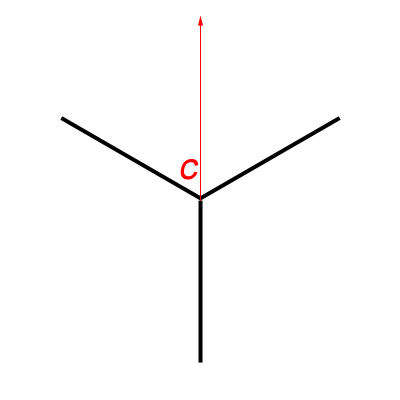
1. In the beginning, and to make it easier to align things perfectly, I've decided to align the camera forward to one of the legs. But first, I had to rotate the VR-head disk (which clicks every specific angular amount as you specify) and fix it on Zero, and then I've loosened the base to rotate the whole base freely and aligned it to one of the legs. This can serve as a starting point and will help us to align the angles as perfectly as possible later on.

The camera (C) pointing to one of the legs directly

2. This alignment, means that we can start from exactly the same point, when the tripod is rotated for 180 degrees. All what we have to do is rotate the camera (and the VR-head) 180 degrees as well and we can start from the same point to do the second panorama. This angle of rotation, 180 degrees, is best in this situation because it guarantees that in the two panoramas, the 3 legs of the tripod will NOT fall in the same place or angle between the two panoramas. If any of the legs in the first panorama falls in a certain angle and another leg, in the second panorama, falls on that same angle, then our overlapping goal fails and the tripod leg in that specific angle can't be removed! (Make a mental image and rotate the triangle in the figure above to 90 degrees around its center).

The camera (C) starts for the second panorama from the same point as before after rotating the tripod 180 degrees (half a circle), and also rotating the camera 180 degrees to make it point to the starting point.

3. As stated before, it is hard to rotate the tripod from the hook on the top, because the legs would close down and I would have to stretch them back as they were before, and in doing so I will definitely loose coordination. Hence, I needed a method to align the center of the tripod in the same point after I rotate it with my hands. Unfortunately, this was impossible to do because the VR-head occupies the space and it was hard to align the center to the ground and put a mark there. I had to resolve the problem in another way, away from its center! Simply by noticing that a two overlapping triangles can form a circle, we can sort something out!

The two positions for the tripod for each panorama. The tips can be connected to form a circle.

4. Instead of aligning the center, we can then use the concept of the circle to point and predict the position of one of the legs when it is rotated. The best leg to be rotated here is the one aligned with the camera (this is the reason in the first place to align the camera to one of the legs). To predict its place after rotation, we measure the the distance between the leg tip to the center of the tripod (radius: r) and then count as much on the other side, and put marks on both positions (mine yielded a radius of 49.5cm).

The radius on both sides: the original starting point for the first panorama, and the predicted place after rotating the tripod for the second panorama.


5. That's it! After doing the first panorama (360 panorama) with one orientation for the tripod, I carried the tripod with both hands and aligned the leg+camera alignment with the second mark. At this point, I've rotated the camera 180 degrees to the back to start from the same point as the first panorama. This order is critical when files are managed by PTGui later on.

The whole process took around 45 minutes, excluding the time spent to adjust the tripod out of the bathroom, and adjusting the camera and lens settings as well. I tried here to use the hyperfocal concept to ensure that the whole range is in proper sharpness, because setting the fisheye lens to infinity here (as I usually do with normal panoramas) will make the floor closer to the camera blurred too much. The camera was finally adjusted to a hyperfocal at f/8. Simply set the camera to f/8 and manually rotate the focusing disk to fix the infinity symbol over "8" on the right side of the middle point. 

Canon 15mm f/2.8 Fisheye lens
Source: B&H

Then after, the struggle of PTGui begins. In fact, the stitch was not at all perfectly good but it was way far better than my previous trials! I'm happy for this despite the broken lines and the weird exposure spots and noise (say, even a normal panorama has those!!). The HDR images were prepared in Photomatix 3 instead of 4 to spare myself some headache. But later on I used version 4 for tone-mapping only.
As a beginning, I've decided to make use of the Blending Priority in PTGui before I begin aligning the images in the very beginning, and this option is supposedly only a numerical value that bears priority but nothing else, i.e. the number you put there is not entered in any calculations but PTGui uses this number to order the importance of the images and which to blend the most and the least (However, I tend to think of it as how much radius of the image is taken into). By default all images are given a value of 100, and as a starter for me, I've reduced this number to 50 for every image that has a leg from the tripod. The initial result was astonishing, and some tuning was done later on to some images to hide more from the legs or broken lines around the toilet seat, which worked as well (but not for the tripod leg which I had to clone later on).

Kackerlacka

In case you wonder about the name, Kackerlacka, it means "cockroach" in Swedish (yes, again). I just liked how it sounds, so I've changed the name from Cockroach to Kackerlacka!
The major fixes were done in HDR mode to hide the remnant of a tripod leg (above the bath tub) which is something I couldn't hide using Blending Priority option. I had to cut a piece from the adjacent walls and stick them there over the remnant of the leg. Also, some spots of colors were there, in HDR mode, under the washing basin and I had to clone these out too. The other fixes were done after tone-mapping the HDR panorama and majorly they were broken lines on the floor and else where, but I didn't fix them all. I was happy enough that my plan worked already and decided to give myself a rest from all the headache of fixes! Taking a row at 45 degrees upward was an idea, but I've neglected that for the time being because I do need to raise the camera a bit more from the ground. In my first trials with this panorama, the camera rotation when it was tilted, caused the setting's center to shift from its place causing more chaos when it comes to stitching! For the time being, this is enough, and might even fit a simple QTVR!

II. Moon on The Roof:
Spent Monday night on the roof trying to test some long exposure procedures. It was a hasty work really and no intention to make some art work out of it. I barely metered and settled everything on the roof (and forgot that the WB was set to K3000). However, with my fisheye lens not much can be done and lengthen the exposure time because I don't have the proper filters that fit to it. I wanted to use this lens specifically for the distortion and the wide view, but I might try to test my 18-55mm lens since I have a filter adapter to this one.
Anyway, this experiment was useful in some aspects. I've realized some problems and aspects that might be helpful for me in the future.
The longest exposure I could get was for 8 minutes, and for some reason I was not able to automate the whole process. I had to come back and forth to the tripod to do the exposure again, as I had some overlapping layers in my mind. To make sure that the breeze won't move the camera I've hung the camera back on the hook on the central column.

Night Photography: Finding your way in the dark

Lance Keimig in his book mentions a lot about the histogram and doing tests before doing the long exposure, but I have to admit I didn't do any of that. I was working in a haste. One thing though was proved as Lance mentioned: the heat produces more noise. The temperature was around 40C (~104F) and that definitely produces not only luminance noise, but also chromatic ones like if the ISO was not set to 100. However, the results were interesting indeed...

Falling Moon

In the beginning I've decided to work with DPP (Canon's software) because as, again, I read in Lance's book, the software of the camera manufacturer is best suited to deal with the noise recorded into the RAW file, while third-party editors, like Photoshop or Lightroom, do not identify this data (but they do give a way to clean the noise and sharpen the image). Long story short, it didn't work. It didn't fit my workflow and I made some mistakes (converting the RAWs to TIFFs in sRGB space) and DPP do not provide ProPhoto space (the highest space I guess was Wide Gamut RGB, which is still lesser than ProPhoto space). One thing though surprised me, sort of, and that was the "Linear" option in DPP. In fact, the Linear option, when turned on, did change the image into the "real" atmosphere that I was looking at on the roof!

One RAW slide before ticking Linear option.

The same RAW slide after ticking the Linear option. This how the sky was in real.

Anyway, I didn't want things to go the normal way, so I followed my old routine with Photoshop. Fixing the WB made an interesting blue sky, the only thing that was missing is a long line made by the moon. However, since I had shot several exposures, I wanted to overlap them. It was not an easy task and the auto-blending in Photoshop didn't help me much so I had to do things manually, and that was awkward! All in All, it was a struggle against the noise and I tried to make a trade between details and the noise...

Luna Cadit (Falling Moon)

Another surprise was waiting for me in this scene though. This little surprise was a delicate one, that with some noise cleaning it just disappears. My place is in the middle of a urban area and of course in such places, it is hard to see stars. Seems, however, this is not the case always...

Click for enlargement to see more clearly.

I think I can learn now for sure that the longer the exposure, the more lights from the stars can be in even in a busy area with so much light pollution like the city. But, this is not an excuse for not going to the desert or any isolate place to take some star trails. I'd love to do this one day, if only I got the means. Hmm, maybe light painting is my next target? Who knows...

III. My Busy Schedule:
After managing some aspect of panoramas in the past 2 weeks, specifically in the Kackerlacka and Asylum panoramas, and looking at the knowledge gained in the past weeks specially about what is related to the Blending Priority in PTGui, I've decided to go for another round and do a panorama that was done some long time ago (and probably in a time when I didn't have even a VR-head). That is a panorama in my office, including myself in it.
I've learned my lessons already from the previous trial, but I never thought I would be doing it again. One of the critical things in such panoramas, and because I have no one to help me out as it should be, the scene must be STATIC. Yes, in bold. A slight movement can screw the whole scene for you. In my case now and with my new trial with this, I did face further problems, as I do with any panorama, yet, I did fix some aspects that did make troubles for me before. I learned new lessons as well this time too!

I'm Busy

I won't go and talk about the nadir point this time. I guess, if you were following the past posts, you know already what kind of headaches involved here and that's why this one is cropped from the bottom (yet, a QTVR can be done later, and this is what I'm thinking of).
The panorama was done completely in the beginning (including taking the nadir and zenith points) and then, carefully without moving the tripod, I've tilted the camera down 45 degrees (because on the couch, my feet won't be showing if the camera was not tilted down). After putting the camera down, I've decided carefully for my places to sit (or lay) and I had to do this VERY slowly to avoid moving any object (and holding the wireless remote of course). I've added myself three times in three close positions on the couch and this was a mistake. The couch stretches and changes its shape when you sit on it, and this is not good for the stitching process and I had to sacrifice this appearance and drop down two slides for me sitting on the left and right. Attention to such details is a MUST.

Playing around with Blending Priority (raising and lowering) was fine in the beginning until I discovered after the FIRST stitches (I made already 3 projections of this panorama) that there was some "blending errors". Some portions of me disappeared (knees of me sitting disappeared and the elbow too, and in other places). Trying to fix these errors in Photoshop was not a good idea. Hence, I've went on and tried to change the blending priority again for several slides and here, I had to do some trade off: when I increase the blending priority for really important slides (mainly those I'm in) I will be ending up with broken lines. I've decided to do it that way since broken lines are, relatively, easy to fix in Photoshop.


The settings for shooting this panorama were critical, mainly the White Balance (WB). In many occasions and many times, whenever I go around my work place shooting under various lights, I always end up with a problem deciding what WB I should use, and henceforth, what color temperature to put when I tone-map my HDR images. This time though, I've decided to go on with a simple test. Since the wall in my office is supposedly called "white" then, why not use it as a Custom WB? Simply, I've took a picture of the wall under the current lighting conditions and configured this image as a custom WB. They say though that it is more accurate to set the WB using a 18% gray card in the location but I think I've made the right decision here, and when it was the time to tone-map the whole thing (after heavy editing in Photoshop) the picture was majorly neutral and natural, and all what was needed is a bit of blue hue to be added (by putting the color temperature in Photomatix down little bit). Although you can set the WB manually later on when you edit a RAW file, but you always see in books some advises about the importance of doing the right WB in place. I think after this experiment I can say it is completely true. Many times when I take pictures from my work place, the WB was hard to be decided for, and usually I would end up with too much bluish images or with purplish ones. Here though, I made use of the Av mode and not the (M)anual mode, since it was so hard to decided for an intermediate shutter speed between highlights and shadows. The difference was vast.
Beside the corrections in Photoshop for the stitching errors, there was also a minor edit to put up the exposure value for the whole scene while putting down the Exposure for the light sources and window. This is my usual way for emphasizing the details in these areas (although the light sources, when blown out, can be attractive as well).
____
After all of this fuss this week, I'm really wondering where am I going? Seems that the more I work with my camera, the more I get isolated, somehow. I still have some ideas to do with my camera but I didn't have time to do them this week, and probably will work on them soon by next week, and until the time comes, my mind will keep being busy with daydreaming, keeping me a dead with open eyes, and imagining how things would evolve around me in a reality that will never happen. I can hear it now going... tick... tock... tick... tock... ... ... tick ... ... ... ... ...